Choose "Save as PDF" in the print window to download.
 NEA
Coursework, calmly managed.
One place to plan, support, mark and evidence coursework for UK schools and colleges.
- — Teacher-led: no AI judging student work
- — Each school’s data kept separate and secure
- — Records archived, never lost
Everything a coursework department needs.
Coursework builder
Build NEA and coursework as clear tasks and sub-tasks, aligned to qualification criteria. Publish fixed versions and deploy them to classes in a few clicks.
Writing Studio
Students write with success criteria, worked examples, phrase banks and planning tools beside them, so they always know what a strong answer looks like.
Built-in workspace
Documents, spreadsheets, slides and diagrams inside the platform, with Word, Excel and PowerPoint export. OneDrive and Google Drive links are supported per student.
Marking & marksheets
Criterion-based marking, comment banks and a class marksheet showing every student and criterion at a glance, with mark history kept.
Practice Studio
Exam questions, multiple-choice sessions and interactive virtual labs that teach to exam-ready depth, with progress tracking for teachers.
Reviews & targets
Record review meetings, agree targets with students and follow them through: Agreed, Working on it, Ready for review, Achieved.
Set up your specification and coursework.

Qualifications
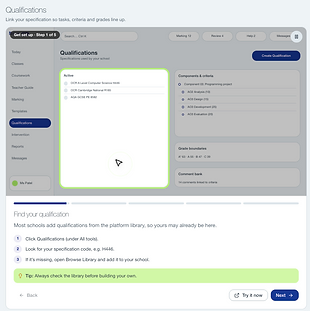
Your specification, set up once.
Each qualification holds its components, assessment criteria, grade boundaries and comment bank. Most are ready in the platform library.
- Criteria marks line up with the exam board
- Grade boundaries applied automatically

Coursework builder
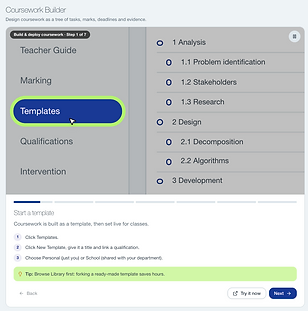
Tasks, marks and deadlines as a tree.
Coursework is built as a template of sections and tasks, then set live for any class. Ready-made templates can be copied and adapted.
- Share templates across the department
- Link each task to its criteria
Bring your classes and students on board.

Classes
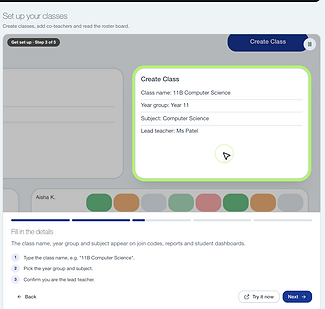
Classes and rosters in one place.
Create a class with its year group, subject and lead teacher. The roster board shows every student’s progress at a glance.
- Add co-teachers to share a class
- Colour-coded progress per task

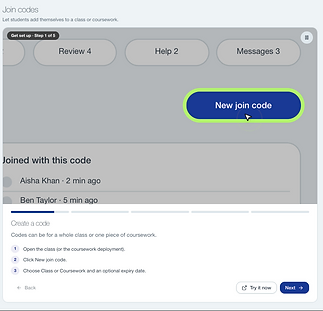
Join codes
Students add themselves.
Generate a code for a whole class or one piece of coursework. Students enter it once and are enrolled straight away.
- Optional expiry dates
- See who has joined, and when
Student work and your day, in one view.

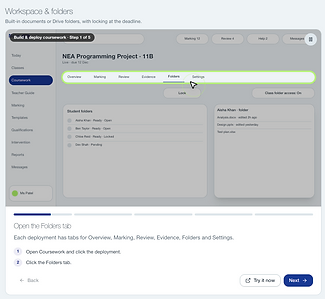
Workspace & folders
Student work, secured.
Each live coursework has tabs for overview, marking, review, evidence, folders and settings. Folders can be locked at the deadline.
- Open any student’s folder
- Lock the whole class in one click

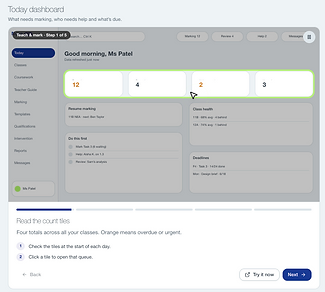
Today dashboard
Your day, prioritised.
Four count tiles show marking, reviews, help requests and messages across all your classes. Orange means overdue or urgent.
- Resume marking where you left off
- A short “do this first” list
See progress and gaps across every class.

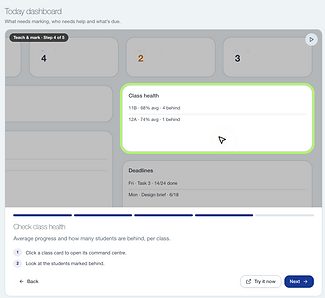
Class health
Who is on track, and who is not.
Each class shows its average progress and how many students are behind. Upcoming deadlines show how many have finished.
- Open a class’s command centre
- Act early on students falling behind

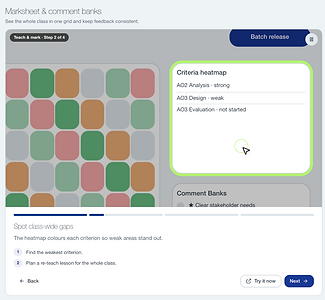
Marksheet & heatmap
The whole class in one grid.
The marksheet colours every criterion for every student, so weak areas stand out. Comment banks keep feedback consistent.
- Plan re-teaching from real gaps
- Release feedback to the class in a batch
Answer “what do I do next?” for any student.

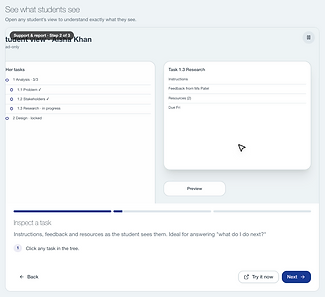
Student view
See exactly what they see.
Open any student’s view to check their tasks, instructions, feedback and resources. It is read-only, so nothing changes.
- Answer “what do I do next?” quickly
- Check feedback has reached them
Less admin. More teaching.
See who needs you today
A daily Today view brings together critical students, missed reviews, help requests and marking, so time goes where it matters.
Students know what to do next
Each student sees their tasks, deadlines, progress and next step, on desktop or phone.
Department oversight
Heads of department see progress across classes, teacher workload and students at risk, without chasing spreadsheets.
Moderation-ready evidence
Submissions, versions, authentication records and archive packs are kept together for internal QA and moderation.
- 1Choose a qualification
- 2Build or adapt coursework
- 3Deploy to your classes
- 4Track, support and mark
- 5Export evidence for moderation
See NEA with your own coursework.
Book a demonstration and we'll walk your department through building coursework, supporting students and marking, using the qualifications you teach.